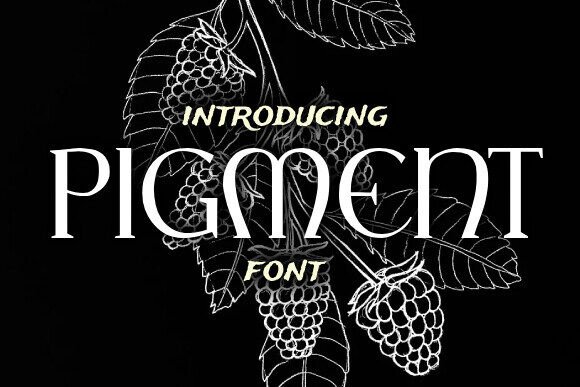
Pigment: A Stylish Serif Font for Web Design
While working on a boutique online store project, I found myself searching for a font that could add a touch of elegance without overpowering the design. Pigment, a stylish serif font, caught my eye. It promised to bring a unique flair to the site's visual identity while maintaining readability across different devices.
The first thing I noticed about Pigment is its refined structure. The serifs are subtle yet distinct, giving it a classic feel that feels modern at the same time. It has a personality that leans toward sophistication but isn’t too formal. This makes it ideal for brands that want to appear polished yet approachable.
I started by testing Pigment in the hero section of the website. The headline was short and impactful, and Pigment’s bold weight made it stand out against a background image. It worked well with the overall aesthetic, adding a sense of luxury that matched the store’s product offerings.
As I moved through the layout, I considered where Pigment would be most effective. It excels as a display font, perfect for headings, logos, and call-to-action buttons. Its visual weight helps create a clear hierarchy, making it easy for users to scan the page and find what they’re looking for.
For body text, I opted for a simpler sans serif font to balance the design. This pairing created contrast without being jarring. The combination allowed Pigment to shine in key areas while keeping the rest of the content easy to read, especially on smaller screens.
One of the challenges I faced was ensuring that Pigment remained legible on mobile devices. I tested it on various screen sizes and found that it maintained clarity even at smaller sizes. However, I avoided using it for long paragraphs, as the intricate details could become harder to read when compressed.
Another consideration was how Pigment looked over image banners. I placed it over a dark background and found that it still stood out without needing additional styling. On light backgrounds, it retained its crispness, which is important for maintaining visual consistency across the site.
When designing for a coaching website, I used Pigment for the main navigation and section headers. It gave the site a professional edge that aligned with the brand’s messaging. The font’s subtle variations in weight helped guide the user through the content without feeling overwhelming.
For a course sales page, I experimented with Pigment in the headline and subheadings. It added a sense of authority and creativity, which was perfect for attracting potential students. The font’s versatility allowed it to work in both large and small formats, making it adaptable to different design needs.
Throughout the project, I made sure to check the font’s availability as a webfont. Pigment came with multiple weights and styles, which made it easy to integrate into the site’s CSS. I also verified that it supported multilingual characters, which was important for the store’s international audience.
Commercial licensing was another factor I considered. Since the font was intended for use on an online store, I needed to ensure that it could be used without restrictions. Pigment’s license allowed for flexible use, which made it a reliable choice for the project.
In a digital brand kit, Pigment served as the primary typeface for all visual assets. From social media graphics to email templates, it provided a cohesive look that reinforced the brand’s identity. Its clean lines and elegant curves made it suitable for both print and digital applications.
When working on a blog redesign, I used Pigment for the header and featured posts. It brought a fresh, editorial feel to the site while maintaining a level of professionalism. The font’s ability to pair well with other typefaces made it a valuable addition to the design system.
Overall, Pigment proved to be a versatile and appealing font for a variety of web design projects. Its combination of style and readability makes it a great choice for designers looking to elevate their digital presence. Whether used in a hero section, a logo, or a call-to-action button, it adds a touch of sophistication that can enhance any online brand experience.